Your own TV, without the hassle.
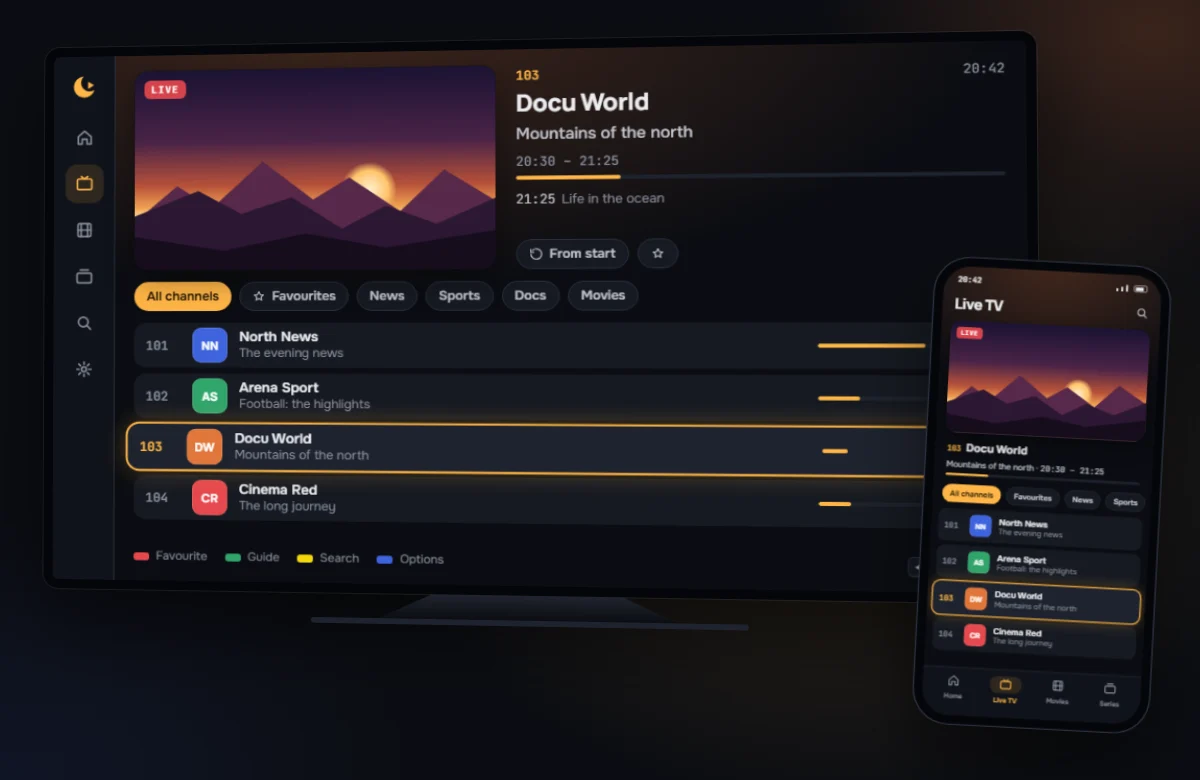
Lounjy plays your IPTV subscription on your PC, phone, tablet and Android TV. Sign in with Xtream Codes or load an M3U playlist. Then flip channels the way you’re used to, with a TV guide that gets it right.
Lounjy does not provide any channels, films or series. You use it with a service you have subscribed to yourself.
Watching in three steps
All you need are the details your IPTV service gave you.
1. Install Lounjy
On your Windows PC, your Android phone or tablet, or your Android TV. See Your device for how it works on each one.
2. Load your playlist
Choose Xtream Codes and enter the server, username and password. Or choose M3U playlist with a link or a file. On a TV you can do this from your phone.
3. Watch
Lounjy loads your channels, films, series and TV guide and shows you how far along it is. Then pick a channel and watch.
Made to just work
No manual needed. The things you do most are one button away.
Set up from your phone
No typing long addresses with a remote. Scan the QR code on the TV and enter your details on your phone. It only works inside your own home network, with a one-time code that expires after ten minutes.
A TV guide that gets it right
Lounjy matches the guide to your channels by itself. Where that doesn’t work, Lounjy suggests a match and tells you how sure it is. If the guide is a few hours off, you shift it back. And if the guide is briefly missing, Lounjy falls back on your service’s short guide.
Channel surfing as you know it
Up and down for the next channel, numbers for a channel number, and one button back to the previous channel. Left opens the channel list. It works with a remote, a keyboard, a mouse and touch.
Everything you’d expect
Even with thousands of channels and hundreds of groups, it stays easy to find your way.
- Live TV with a TV guide and a preview of the channel before you choose.
- Films and series with continue watching and the next episode.
- Search channels, films, series and the TV guide at once.
- Groups by country, with your favourite groups up front.
- Favourites and recent channels, plus your own layout: rename, renumber, reorder and hide.
- Duplicate channels merged. If one version drops out, Lounjy tries another.
- Watch from the start and rewind a little, if your service supports it.
- Subtitles and audio language remembered, with subtitles in the size you like.
- Day and night, or automatic like your device.
- Keeps itself up to date: channels and guide stay current, never while you’re watching.
- Only play via VPN, if you want to.
- Backup of your settings, without any passwords in it.
One app on PC, phone and TV
The same layout everywhere. What you learn on the PC works on the TV too.
Free, and Plus if you want more
The free version has everything you need to watch. Plus is for people who want more control. One Plus licence works on up to five devices.
Free
€0
- One playlist with live TV, TV guide, films and series
- Search, favourites and recent channels
- Set up from your phone
- Subtitles and language preferences
- No ads
Plus
Coming soon
- Everything in Free
- Multiple playlists
- Watch from the start and catch up, if your service supports it
- Your own layout: rename, reorder, hide
- Watchlist with reminders
- Backup and restore
What Lounjy doesn’t do
No channels or content
Lounjy is only a player. It comes without playlists and doesn’t point you to any service. You watch what your own service provides.
No ads
Not in the free version and not in Plus. Relaxed viewing is the whole point.
No tracking
Lounjy doesn’t send what you watch to us. Your login details stay encrypted on your own device. Read the privacy statement.
Ready to watch?
Install Lounjy on the device you use most. The rest follows.